

Timing and sequence of speeches
For the current topic, see Debate topics.
- Affirmative Constructive: 6 minutes
- Cross Examination: 3 minutes. Negative speaker asks questions of the affirmative.
- Negative Constructive/Rebuttal: 7 minutes
- Cross Examination: 3 minutes. Affirmative speaker asks questions of the negative.
- Affirmative Rebuttal: 4 minutes
- Negative Rebuttal: 6 minutes
- Affirmative Rebuttal: 3 minutes
An LD debate round lasts approximately 45 minutes. Affirmative debaters support the resolution. Negative debaters reject the resolution. Although each debater has 13 minutes of speaking time, the Affirmative has 3 shorter speaking blocks and the Negative has 2 longer blocks. Each debater is allowed 4 minutes preparation time for the round. Judges keep time, so they know when a debater has reached their time limit. The judge should call time when the limit is reached.
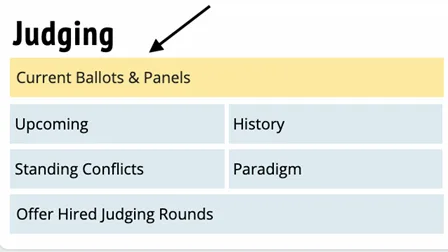
When you receive your assignment (via text and/or email), proceed quickly to the classroom. When you arrive, sit in the back of the room and on your laptop, go to Tabroom.com. Click on your email address at the top right corner, find the button that says Current Ballots and Panels. When both debaters have arrived, click the green START ROUND button. This action will activate your ballot for the round.
The judge’s role during the debate round
- Take notes and listen actively to the students. Even though you may have personal opinions on the topic, you should only evaluate arguments that the students present.
- Keep time. Generally, students will time themselves, but to ensure students do not run over their allotted time, the judges should also keep time. When a student reaches their limit, you should clearly (but politely) tell them they have reached their limit. Judges must also keep track of prep time.
- Do not provide verbal feedback, either during or after the round. When the round is finished, students should not know how you are voting.
When the debate is finished, you have 2 tasks
1. Choose a winner and assign points to each debater
As soon as possible after the round ends, submit your decision and speaker points. Speaker points measure the speaking quality, style, and delivery. The win/loss decision should reflect analysis and argumentation. When assigning speaker points, think of the last two numbers as a grade on a normal 100-point scale. For example, a 29.8 is like a 98 grade, which is an A+, and a 27.1 is like a 71 grade, which is a C. The winning debater must receive higher speaker points.
Scale for assigning speaker points
| Points | Meaning |
|---|---|
| 29.5–30.0 | I wish I could frame your speeches – hard to imagine a better speaker |
| 29.1–29.4 | You were consistently excellent |
| 28.8–29.0 | You were effective and strategic, and made only minor mistakes |
| 28.3–28.7 | You hit all the right notes, but could improve (e.g. depth or efficiency) |
| 27.8–28.2 | You mainly did the right thing, but left a few things to be desired |
| 27.3–27.7 | You missed major things and were hard to follow. |
| 27.0–27.2 | You advanced little in the debate |
| 26.0–26.9 | You are not ready for this tournament and cost you the round. |
| Below 26 | You were offensive, ignorant, rude or tried to cheat. If this is assigned, the judge must contact tournament managers in the tab room |
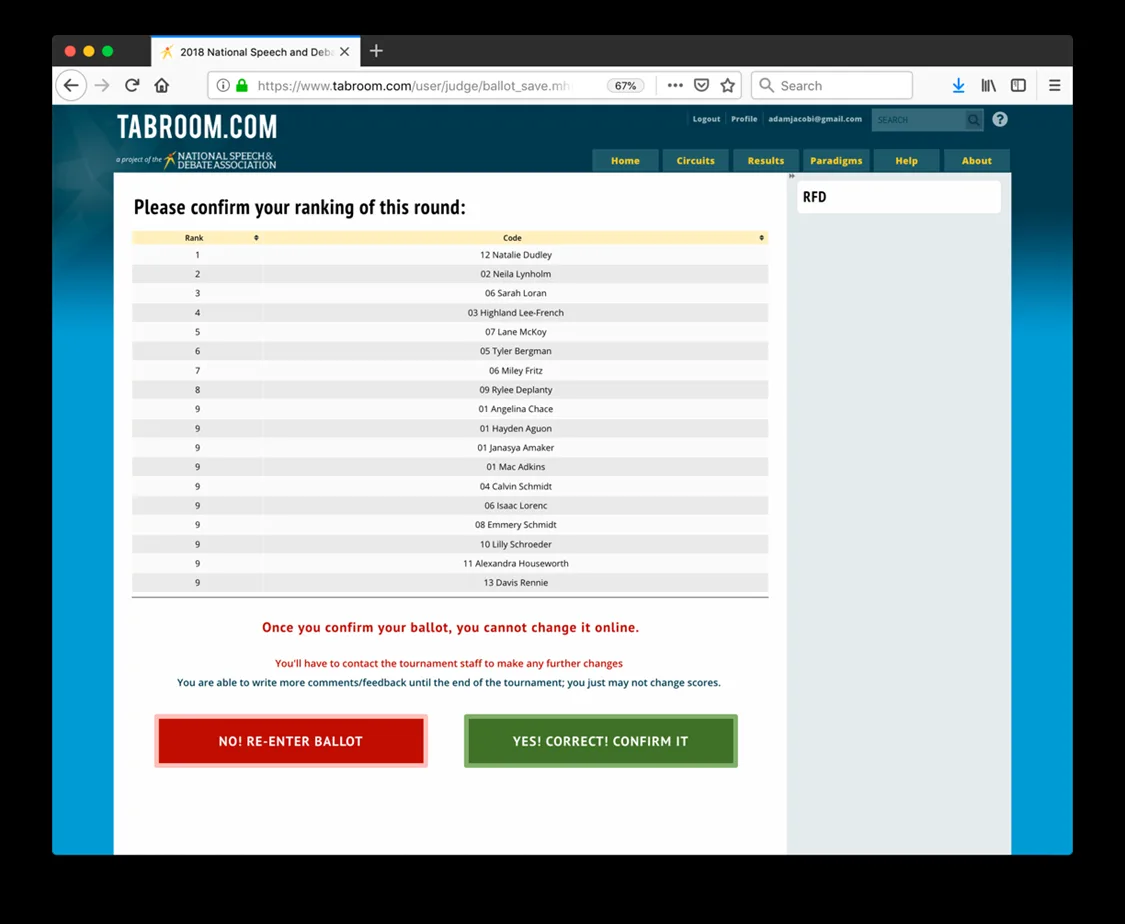
When you have made your decision, click the Submit Ballot button. After submission, you must confirm your ballot. You’ll be shown your decision and points, with the option to re-enter or confirm. This message looks alarming, but if your decision and points are accurate, just push Yes! Correct! Confirm it.
2. Provide feedback to both debaters
The ballot has three different tabs where you can write comments:
- Reason for Decision (RFD): These comments go to both debaters and their coach. This explains why you voted for one over the other. This is the most important feedback for the students.
- Feedback for Affirmative. This is only visible to the Affirmative debater and their coach. The Negative debater will not see them.
- Feedback for Negative. This is only visible to the Negative debater and their coach. The Affirmative debater will not see them.
You will see a button at the top right labeled “Save Feedback.” It saves your work, but doesn’t finalize the comments. Your decision and speaker points need to be submitted soon after the round ends. However, the comments sections for all your rounds will remain open for at least 30 minutes after the last round of the day has finished. Just click on Edit Comments to revise your feedback during the day.
Common questions
Suppose I’m not assigned a round to judge? Please remain in the Judges Lounge. Often we need people to fill in for missing judges. A tournament manager will announce when non-assigned judges are free.
Suppose there is an issue in the round? If judges or students need to contact tournament officials quickly on tournament day, please text (844) 676-0212. Identify yourself and the room you are in, along with the issue. Please do not call – the phone number is only for texts.
Help students straighten up the classroom after each round. We are guests at the host school. Before you leave the classroom, please ask students to help you arrange chairs and get the room back to its original configuration. On Monday morning, teachers should find desks and chairs where they left them on Friday.